Appearance
The gallery picker
What the person sees. The composer's "+" opens the device's gallery over the conversation: the person's photos in a grid, with the story camera and the Imagine tile above it.
What you do. You open the picker (DirectMediaPickerPhotosScreen) from a conversation (thread.openMediaPicker()) and send the picture the person picked (sendPhoto({ file })), which uploads it and broadcasts photo_attachment in one step. The app stays on the picker after a send; so does the screen.
Opening the picker sends the grid's own IGMetaMediaCloudAppsQuery while the conversation is still in front; the answer lists the cloud apps the grid offers, and the Simulator reads none of it — it never reads the person's own gallery, so a send takes the file's bytes.
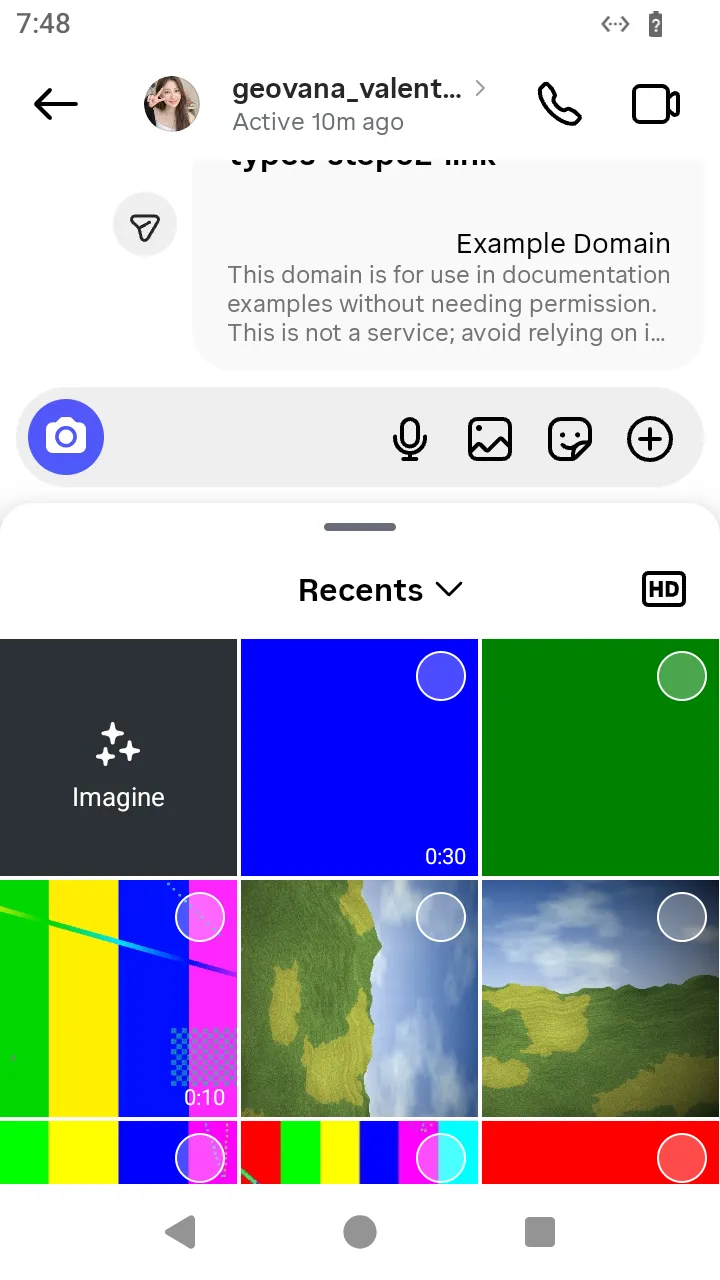 The picker opened from the composer:
 thread.openMediaPicker().
ts
// Open the composer's gallery picker and send the photo the person picked.
const picture = await readFile('photo.jpg');
const photo = await AndroidIgpapi.launch({
  checkpoint: saved,
  screen: FeedTimelineScreen,
  main: feed =>
    Effect.gen(function* () {
      const tab = yield* feed.openDirectTab();
      const item = tab.threads[0];
      if (item === undefined) return undefined;
      const thread = yield* item.open();
      const picker = yield* thread.openMediaPicker();
      if (!DirectMediaPickerPhotosScreen.is(picker)) return undefined;
      return yield* picker.sendPhoto({ file: picture });
    }),
});
console.log(photo);
What this screen does not offer
A video from the gallery, the story camera and the Imagine tile above the grid: the app has them, the Simulator has no action for them yet. A photo picked from the conversation's details, or a send the picker defers while the person keeps browsing, are the same path with another entry.